
I opened my Etsy shop on a Wednesday night and then didn’t touch it again for nine days.
Not because I lost interest. Because the setup process surfaced about fifteen small decisions I hadn’t thought through — what to name the shop, how to write a shop policy I’d never had to write before, what my “shop announcement” should say, whether I needed a business license, how shipping profiles worked even though I was selling something digital. Each one felt small individually. Together, they were enough friction that I closed the tab and told myself I’d “finish it this weekend,” which became next weekend, which became nine days later when a friend asked how my shop was doing and I had to admit it wasn’t actually open.

The day I finally pushed through and finished it took about ninety minutes, start to finish. All that delay over ninety minutes of actual work.
This guide exists so you don’t lose nine days the way I did. It’s the complete setup process, the decisions that actually matter versus the ones you can make quickly without overthinking, and what it actually took to get my first sale once the shop was live.
Before You Open Anything: What You’re Actually Deciding
Etsy asks you to make a lot of choices during setup, but only a handful genuinely matter for your shop’s success. Here’s the distinction worth knowing before you start clicking through the setup flow.
Decisions that matter and deserve real thought: your shop name, what you’re going to sell first, your pricing approach, and your shop’s visual consistency (banner, logo, photo style).
Decisions that don’t matter much and shouldn’t slow you down: your shop announcement text, your exact “about” section wording on day one, and most of the optional profile fields. These can all be edited later in minutes. Don’t let them become a blocker.
Knowing this distinction in advance would have saved me most of those nine days.
Related: Best Digital Products to Sell Online
Step 1: Create Your Etsy Account
If you don’t already have a regular Etsy account (as a buyer), go to etsy.com and sign up with an email address, Google account, or Facebook account. This part takes about two minutes.
If you already have a buyer account, you can use the same login to open a shop — Etsy doesn’t require a separate account for selling.
Step 2: Start the “Open Your Shop” Process
From your account, go to Etsy’s seller dashboard (you can find this through “Sell on Etsy” in the footer, or by going directly to etsy.com/sell). Click to start opening a shop.
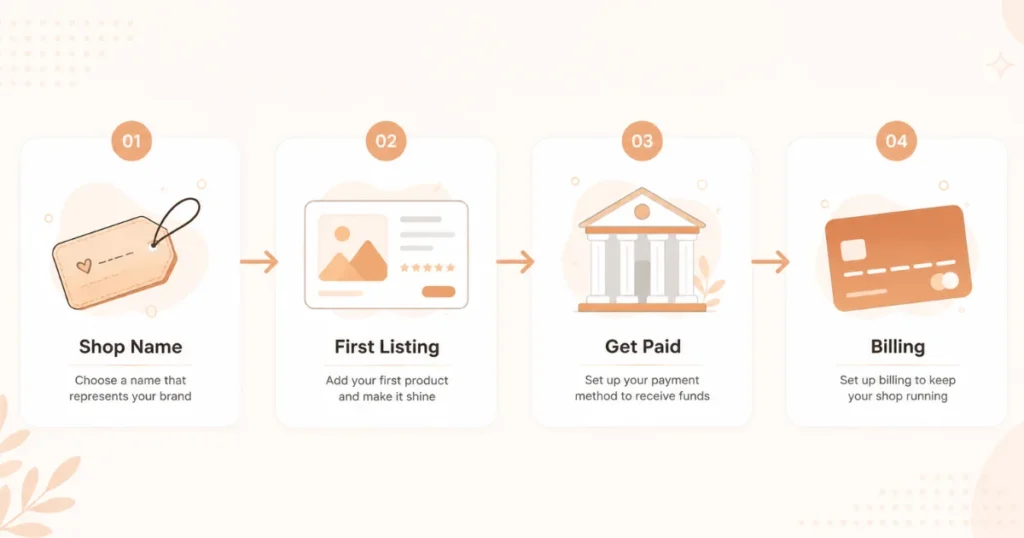
Etsy will walk you through a guided setup flow. Here’s what each part actually involves and how much time to spend on it.
Shop Preferences
Etsy asks for your shop language, country, and currency. These are straightforward — pick what matches where you’re based and who you’re primarily selling to. For most sellers targeting a US audience, this means English and USD regardless of your own location, since your buyers’ currency experience matters more than your own.
Shop Name
This is the decision worth slowing down for, because changing it later, while possible, isn’t ideal once you have reviews and brand recognition built around the original name.
What makes a good Etsy shop name:
Available (Etsy will tell you immediately if it’s taken — common, generic words are almost always gone).
Easy to spell and remember — avoid unusual spellings or numbers that make it hard for someone to find you again later by typing the name from memory.
Reasonably broad if you plan to expand beyond your first product type. A name like “BudgetPlannerCo” limits you if you later want to sell wedding templates too. Something like “ClearPathStudio” or “PaperTrailDesigns” leaves room to grow.
Not legally trademarked by someone else — a quick Google search of your prospective name plus “Etsy” helps you avoid an obvious conflict.
My honest process: I tried about eight name variations before settling on one. Most of my first choices were taken. I’d recommend having three or four backup options ready before you start this step, since the disappointment of “this is taken” repeatedly can otherwise turn into unnecessary decision paralysis.
Stock Your Shop (Your First Listing)
Etsy will prompt you to add your first product as part of the setup flow. If you already have a digital product built and ready (a PDF, template, or similar), this is straightforward — upload the file, add photos, write your title and description.
If you don’t have a product ready yet, you can technically skip ahead and add it after finishing setup — but I’d recommend having at least one product fully prepared before you start this process. Half-finishing shop setup because you’re missing the actual product is exactly the kind of stall that cost me those nine days.
For digital products specifically: make sure you select “digital” as the listing type, not physical. This changes the delivery method (automatic file delivery instead of shipping) and removes the shipping profile requirements that physical listings need.
How You’ll Get Paid
Etsy uses Etsy Payments to handle transactions, which requires connecting a bank account (or, in some regions, a debit card) where your earnings will be deposited. This step is mandatory before your shop can go live — Etsy won’t let you publish listings without it set up.
You’ll also enter your tax information here, since Etsy needs this for reporting purposes depending on your country and sales volume.
Set Up Billing
Etsy charges fees for each listing ($0.20 per listing, charged regardless of whether it sells) and takes a percentage of each sale (currently around 6.5% transaction fee, plus a separate payment processing fee). You’ll need to provide a card on file for these fees, separate from the bank account where your sales income gets deposited.
Step 3: Before You Publish — The Shop Pages Worth Setting Up Properly
Once the core setup is done, a few additional shop sections genuinely affect buyer trust and conversion. These are worth doing properly rather than rushing.
Shop Policies
Etsy requires you to set policies covering things like processing time, returns, and exchanges. For digital products specifically, this section needs to clearly state that downloads are non-refundable except in cases of technical issues (a corrupted file, for example) — this is standard practice and protects you from buyer’s remorse refund requests on a product that’s already been delivered.
A simple, clear policy: “Due to the nature of digital products, all sales are final. If you experience any technical issues downloading or opening your files, please message me and I’ll help resolve it.”
Shop Icon and Banner
Your shop icon (the small circular image representing your shop) and banner (the wide image at the top of your shop page) are the first visual impression a buyer gets. They don’t need to be elaborate — a simple, clean design in Canva using your shop’s color scheme is enough. Spend twenty minutes here, not two hours.
About Section
This is where you introduce yourself and your shop. Buyers do read this, especially once they’re considering a purchase and want reassurance there’s a real person behind the shop. Two or three genuine paragraphs — who you are, why you started the shop, what you’re hoping to help buyers with — is sufficient. Avoid generic templated language; specificity here builds more trust than polish does.
Related: Etsy SEO Tips for Digital Products: How to Rank Your Listings Fast
Step 4: Writing Your First Listing Properly
This is the step that actually determines whether anyone finds your shop, and it deserves more attention than the rest of the setup combined.
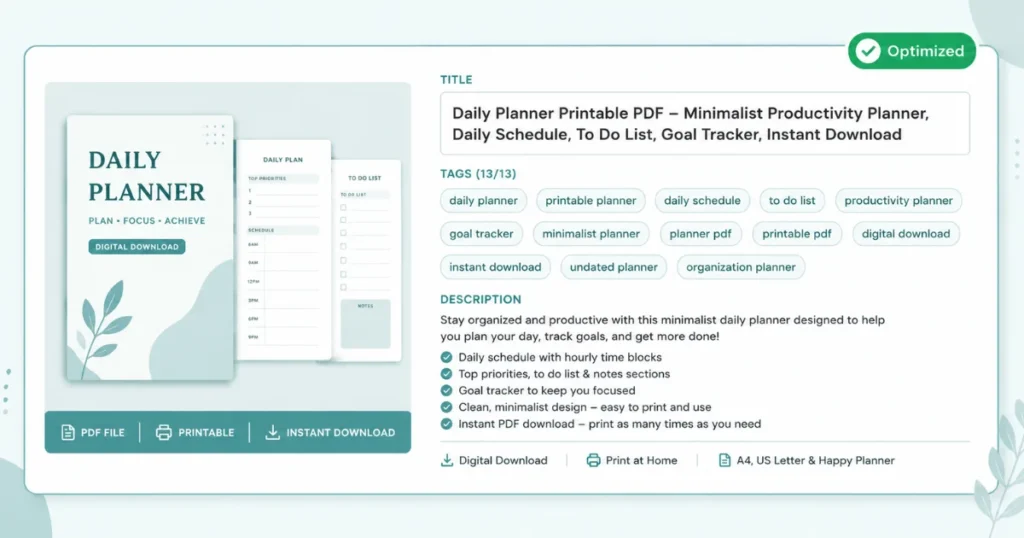
Title: Use Etsy’s full character allowance (up to 140 characters) and focus on the specific keyword phrases a buyer would actually type into Etsy’s search bar — not creative or vague language. “Monthly Budget Planner Template Printable Editable Canva Digital Download” tells Etsy’s search algorithm exactly what you’re selling and matches multiple possible search phrases.
Tags: Use all thirteen available tags, each as a specific multi-word phrase rather than a single broad word. “Budget planner” as a tag phrase performs better than the single word “budget” or “planner” separately.
Description: Open with the specific problem the product solves, list exactly what’s included, and address the obvious buyer question (what software is needed, is it editable, how do I access the file after purchase).
Photos: Show the actual product clearly in the main image, ideally with a clean mockup (a phone or laptop screen displaying the design, or a printed page if it’s a printable). Etsy allows up to ten images per listing — use several to show different pages or angles of what’s included.
Category and attributes: Choose the most specific category available, not the broadest. Fill in every relevant attribute Etsy offers for your category — these affect whether you appear in filtered browsing, separate from keyword search.
Step 5: Publishing and What Happens Immediately After
Once your listing is complete and your billing and payment setup is done, you can publish. The shop goes live, and your first listing becomes searchable.
What I noticed in the first 48 hours: A small number of views (around fifteen to twenty) without any sales. This is normal — Etsy gives new listings a temporary “new listing” visibility boost in their first couple of weeks, but views converting to sales depends on your listing actually matching what someone was searching for and looking appealing enough to click and buy.
Getting Your First Sale: What Actually Worked
My first sale came on day six after publishing, not day one or two. Here’s specifically what happened in between, and what I think mattered.
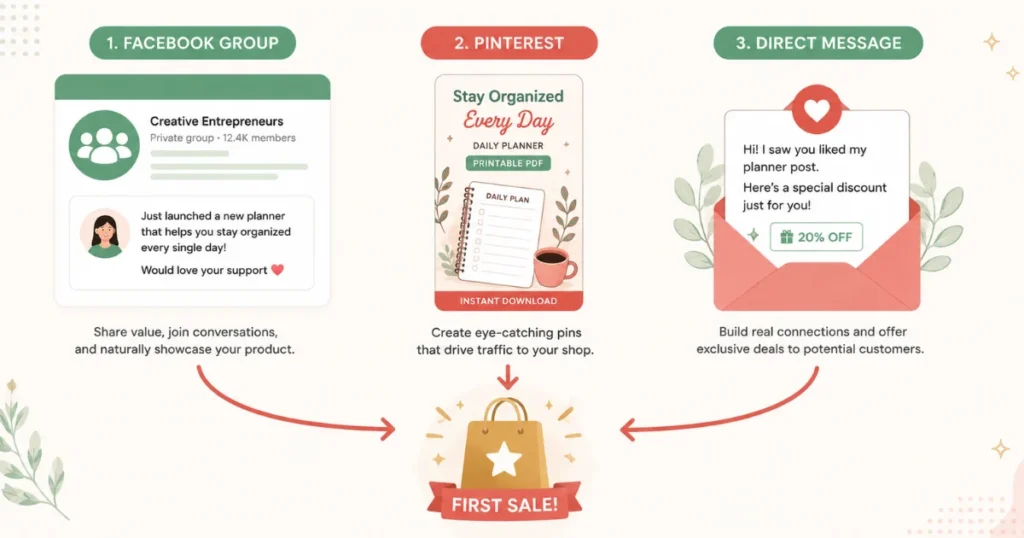
I shared the listing directly with five people I knew who fit the target audience for my product (in my case, other freelancers). Not a hard sell — just “hey, I made this, thought you might find it useful, here’s the link if you want to check it out.”
I posted in two relevant Facebook Groups where my target audience was active, framing it as a genuine recommendation rather than an advertisement.
I created three Pinterest pins in Canva, using keyword-rich descriptions matching how I expected buyers to search (“freelance client onboarding template,” for example), and scheduled them using Pinterest’s free native scheduler.
My actual first sale came from one of the Facebook Group posts — someone who saw it, checked the listing, and bought it within the hour. The Pinterest pins took about two more weeks before they started generating any traffic at all, which matches what most experienced Etsy sellers will tell you: organic search traffic on Etsy and Pinterest both take real time to build, even when everything is set up correctly.
Common Mistakes That Slow Down a New Etsy Shop
Spending too long on shop aesthetics before publishing. The banner, icon, and about section matter, but they’re not why people find you. A shop with a basic but clean banner and a well-optimized first listing will outperform a shop with a beautiful banner and a vague, poorly-tagged listing every time.
Writing titles and tags for aesthetics instead of search behavior. This was close to my own first-product mistake. A title needs to function as a search-matching tool first.
Publishing only one listing and waiting. A single listing limits your visibility surface area. Adding a second and third related product, even simple ones, multiplies the number of search terms your shop can be discovered through.
Not setting clear digital product policies. Without a clear “digital downloads are non-refundable except for technical issues” policy stated upfront, you open yourself up to confusion and potential refund disputes from buyers who didn’t realize what they were purchasing.
Underestimating how long organic traffic takes. Expecting consistent sales within the first week, before any real search history or reviews exist, leads to premature discouragement. Most genuinely successful Etsy digital shops take six to twelve weeks before sales feel consistent rather than sporadic.
What the First Month Actually Looked Like
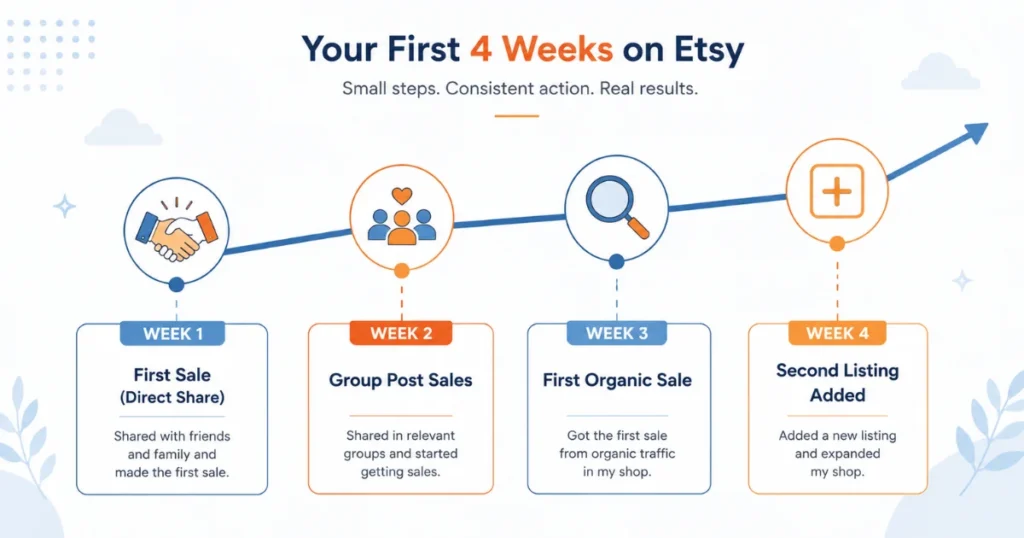
Week 1: Shop published, one listing live. Day six: first sale, from a direct share.
Week 2: Two more sales, both from the same Facebook Group post being seen by new members as the group’s activity continued. Pinterest pins still showing minimal traffic.
Week 3: One sale from Pinterest — the first one not traceable to a direct personal connection. This felt like the real proof point that the listing itself, not just my own promotion, could generate a sale.
Week 4: Added a second related listing. Three total sales across both listings, with Etsy’s own search starting to show small but real traffic to both.
Month one total: Seven sales, roughly $94 in revenue before fees. Modest, but a genuinely working proof of concept rather than a one-off fluke.
Final Thoughts
Those nine days I spent stuck before finishing setup were entirely unnecessary in hindsight. None of the decisions I was overthinking — the shop announcement wording, the exact about section phrasing — mattered nearly as much as just getting the shop open and the first listing live with a properly researched title and tags.
The actual setup, once I sat down and did it, took ninety minutes. The first sale took six more days after that, mostly through direct sharing rather than any algorithm magic. The real organic traffic — the sales that came from strangers finding the shop without my direct involvement — took closer to three weeks to start appearing at all.
If you’re staring at the “Open Your Shop” button right now, the most useful thing I can tell you is that most of what feels like it needs careful consideration can be fixed in minutes later. Open it. Publish one well-researched listing. Tell a few real people about it. The rest follows from there.
FAQs
How much does it cost to open an Etsy shop?
Opening the shop itself is free. Each listing costs $0.20, charged whether or not it sells, plus a transaction fee (around 6.5%) and payment processing fee on actual sales. There’s no subscription requirement to have a basic Etsy shop open.
Do I need a business license to sell on Etsy?
This depends on your country and local regulations, and on your sales volume. Many people start as a sole proprietor or equivalent without formal registration, then formalize the business structure once sales become significant. Check your local requirements, since they vary meaningfully by location.
How long does it take to get your first sale on a new Etsy shop?
In this case, six days, primarily through direct sharing rather than organic search. Organic, unprompted sales (from strangers finding the listing through Etsy or Pinterest search) typically take two to four weeks longer to start appearing, even with solid SEO in place.
Can I sell digital products on Etsy without any design experience?
Yes. Canva’s free tier, combined with its templates, makes creating professional-looking digital products accessible without prior design skills. Focus on solving a clear, specific problem; the visual polish can improve with each new product you create.
Should I open multiple listings right away or start with just one?
Starting with one well-researched, properly optimized listing is fine — better to do one thing well than five things poorly. But adding a second related listing within the first few weeks meaningfully increases your shop’s discoverability and is worth prioritizing early rather than waiting months.