I almost quit my business in month three.
Not because it wasn’t working — it actually was picking up. But I was spending 11-hour days doing things that, looking back, a decent AI setup could’ve handled in 20 minutes. Customer emails. Social media captions. Invoicing follow-ups. Research. I was doing all of it manually, convinced that “personal touch” meant doing everything myself.

Then a friend showed me how he’d set up a small e-commerce brand — just him, no employees — pulling in $15K/month. When I asked how he managed everything alone, he pulled up his Notion dashboard and walked me through a system so clean it made me genuinely embarrassed about how I was running things.
That was the wake-up call. I spent the next few months actually learning how to use AI in a way that made my business run smoother — not just dabbling with ChatGPT to write a few emails, but building real workflows. This guide is what I wish someone had handed me back then.
First, Stop Thinking of AI as a Shortcut
This is the mistake almost every entrepreneur makes at the start — treating AI like a magic button. You type in a vague prompt, get a mediocre output, and then complain that “AI isn’t that useful.”
The real shift happens when you stop asking AI to do things for you and start building systems where AI handles the repetitive, time-consuming parts of your operation automatically.
There’s a difference between using AI and automating with AI. Both matter, but automation is where the real leverage is.
Step 1: Audit Your Time Honestly
Before touching any AI tool, spend one week tracking where your time actually goes. Not where you think it goes — where it actually goes.
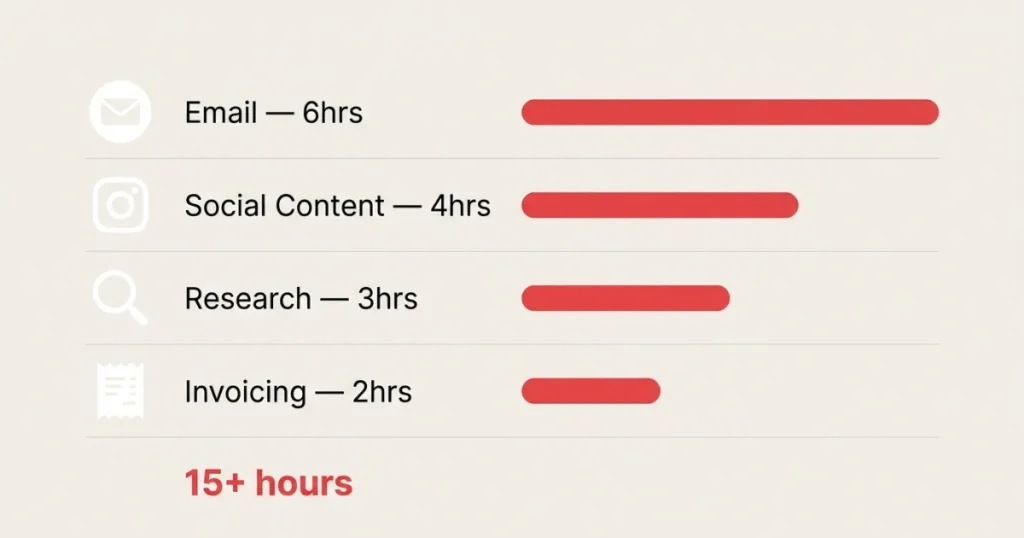
I did this with a simple Google Sheet. Every task I did, I logged it with a rough time estimate. By the end of the week, I realized I was spending:
- 6+ hours/week writing and responding to emails
- 4+ hours/week creating social content
- 3+ hours/week doing research for client proposals
- 2+ hours/week chasing invoices
That’s 15+ hours on tasks that are either repetitive or templated. Every single one of those was a candidate for AI or automation.
Your list will look different, but do this exercise. You need to know where the drain is before you can plug it.
Step 2: Start with the High-Frequency, Low-Complexity Tasks
When people first automate, they go after the big stuff — “I want AI to run my whole marketing strategy!” That’s a mistake. You’ll get overwhelmed, the quality will be inconsistent, and you’ll abandon it.
Start small. Pick one or two tasks you do every single day that don’t require deep judgment.
For me, the first win was email. I set up a system using Claude (Anthropic’s AI) with a saved prompt template for client inquiry responses. Every time a new inquiry landed in my inbox, I’d paste it in, get a draft in 30 seconds, tweak for 2 minutes, and send. What used to take 15-20 minutes per email dropped to under 5.
Not glamorous. But I got back about 4 hours a week immediately.
Other good starting points:
- Social media captions — Feed AI your product/service, tone of voice, and let it draft. You edit, you post.
- Meeting summaries — Tools like Otter.ai or Fireflies transcribe and summarize calls automatically.
- FAQ responses — Create a knowledge base and let AI draft answers to common customer questions.
Step 3: Build Your First Real Automation (Not Just a Prompt)
There’s a difference between using AI manually and automating it. Automation means the thing happens with minimal or zero input from you.
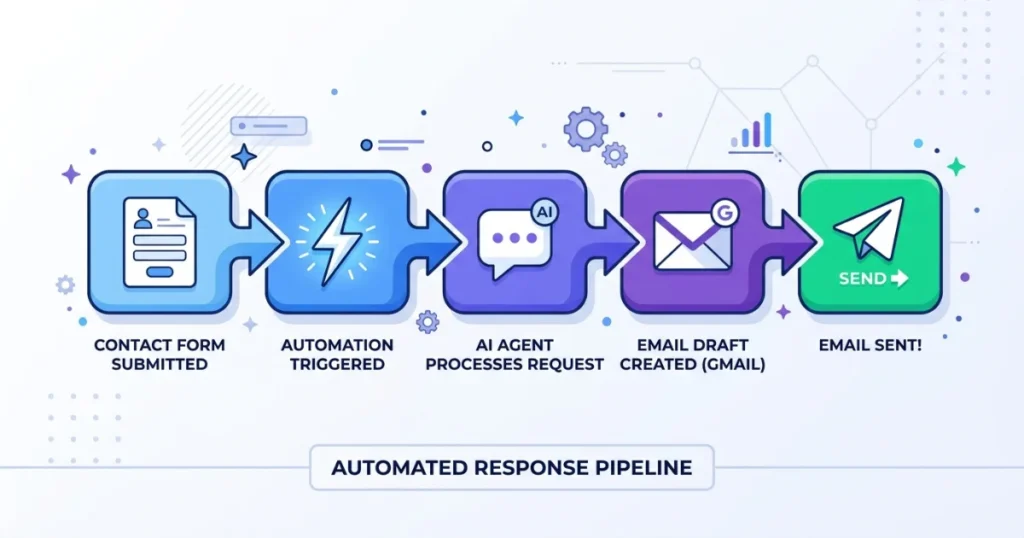
Here’s a simple automation I built that saved me hours every month:
The Setup: New contact form submission → Zapier triggers → pulls the inquiry details → sends to Claude API → generates a personalized first-response email draft → drops it into a Gmail draft folder → I review and send.
Total time I spend? About 90 seconds per lead.
You don’t need to be a developer to build this. Zapier, Make (formerly Integromat), and n8n are no-code/low-code tools that connect your apps and let you plug AI into the middle. They have templates for common workflows, and the learning curve is maybe a weekend of playing around.
Other automations worth building early:
- Invoice reminders — Connect your invoicing tool (FreshBooks, Wave, QuickBooks) to send automatic follow-up emails after 7, 14, and 30 days overdue.
- Content repurposing — Automatically take your blog posts and feed them into AI to generate 5 social media posts per article.
- Lead scoring — Use AI to read inbound leads and flag which ones match your ideal client profile.
Read More: Automate Your Online Income Step by Step
Step 4: Use AI for the Thinking Work, Not Just the Writing
Most entrepreneurs use AI for writing. That’s fine, but you’re leaving a lot on the table.
Some of the most valuable things I now use AI for have nothing to do with generating text:
Competitor research. I paste in a competitor’s website, pricing page, or even customer reviews, and ask AI to summarize where they’re strong, where they’re weak, and what gaps I could target. It’s not perfect, but it gives me a structured starting point in minutes instead of hours.
Pricing strategy conversations. I describe my service, my target client, my current pricing, and ask AI to pressure-test my assumptions. It’ll surface objections I hadn’t considered.
Decision-making frameworks. Facing a tough call? Describe the situation and ask AI to lay out the tradeoffs, not make the decision for you. It’s like having a sounding board that never gets tired of your problems.
Customer research synthesis. Paste in 20 customer reviews and ask AI to identify the three most common pain points and the three most common compliments. That’s your positioning gold.
Step 5: Pick the Right Tools for Your Business Type
Not every AI tool is worth paying for. Here’s what’s actually worth it based on the type of business:
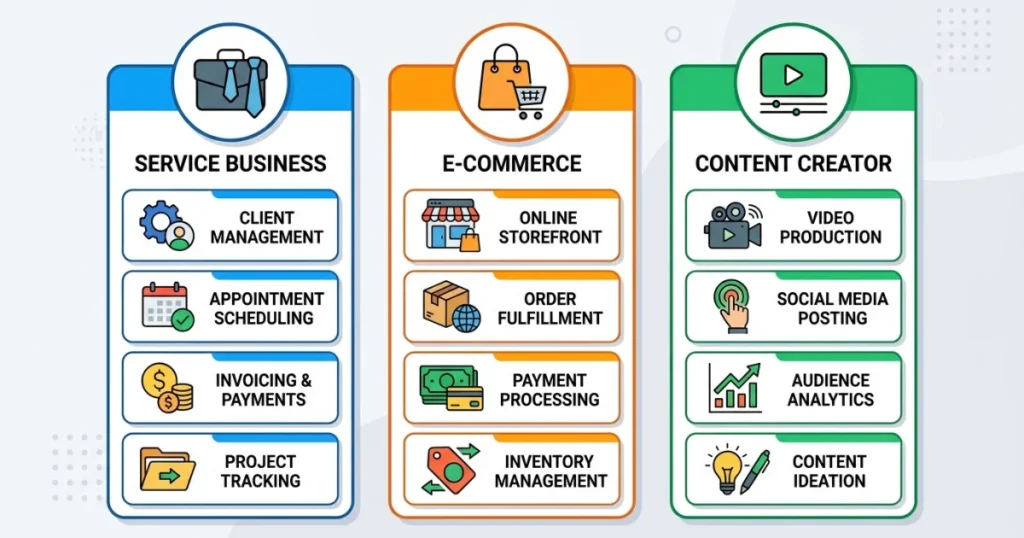
For service businesses (consultants, freelancers, agencies):
- Claude or ChatGPT — Daily thinking and writing partner
- Notion AI — Keeps your knowledge base smart and searchable
- Fireflies.ai — Automatically transcribes and summarizes client calls
- Zapier — Connects everything
For product/e-commerce businesses:
- Klaviyo with AI features — Smart email segmentation and personalization
- Tidio or Intercom — AI chat for customer support
- Shopify Magic — Built-in AI for product descriptions and content
- Inventory forecasting tools — Some inventory systems now have AI built in
For content creators and media businesses:
- Descript — AI-powered video editing
- ElevenLabs — Voice cloning and text-to-speech for audio content
- Claude or GPT-4 — Long-form content drafting and editing
- Buffer or Publer with AI — Social scheduling with AI-assisted copy
Read More: Best AI Tools to Make Money Online
The Mistakes I Made (So You Don’t Have To)
Mistake #1: Automating a broken process. I once automated my onboarding emails without realizing the emails themselves were confusing. I just automated the confusion and sent it to more people faster. Fix the process first, then automate it.
Mistake #2: Over-relying on AI-generated content without editing. I went through a phase of publishing AI drafts with minimal editing. The engagement dropped noticeably. People can feel when content has no personality. AI should be your first draft, not your final one.
Mistake #3: Trying to automate everything at once. I got excited and tried to build 10 automations in one weekend. Half of them broke, and I didn’t know which was which. Build one, test it for two weeks, then add the next.
Mistake #4: Not documenting my prompts. Early on, when I found a prompt that worked really well for something, I’d just use it and move on. Then I’d need it again and couldn’t remember what I’d written. Now I keep a prompt library in Notion. Game-changer.
What an AI-Powered Business Day Actually Looks Like
For context, here’s roughly what my mornings look like now:
I check my automation dashboard (I use a simple Notion page that aggregates key metrics). Overnight, Zapier has already processed new leads, drafted response emails, and added them to my Gmail drafts folder. My social media posts for the day were scheduled the night before using a batch I created once a week. Any new customer support tickets have been triaged by my chatbot — straightforward questions answered automatically, complex ones flagged for my attention.
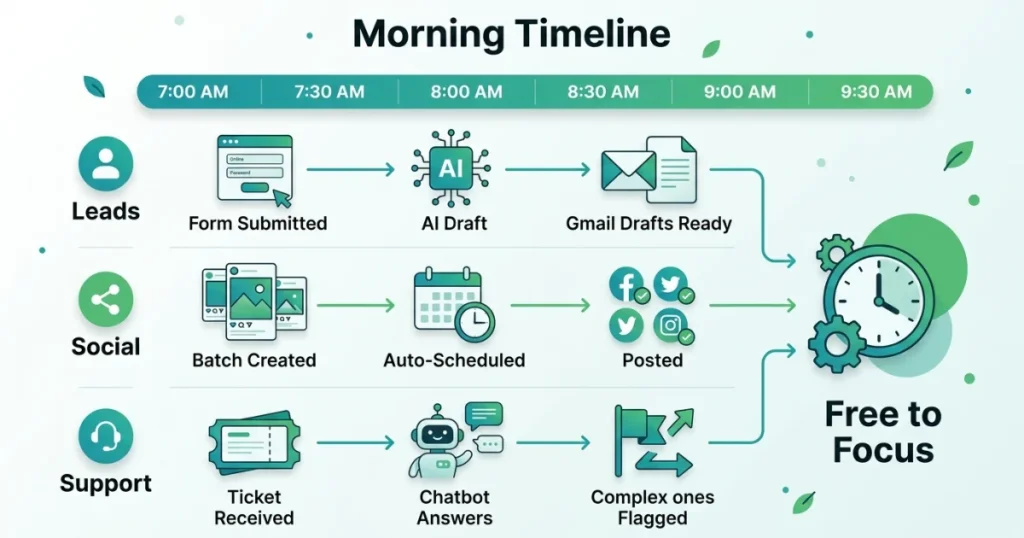
By 9:30 AM, I’ve reviewed what the system did overnight, made any needed tweaks, and I’m free to work on actual high-value things — client strategy, product development, partnerships.
This didn’t happen overnight. It took about three months of building and iterating. But the compounding effect is real.
Where Most Entrepreneurs Stop Short
Here’s the honest truth: most people read guides like this, get inspired, try one thing, and then stop when it doesn’t work perfectly on the first attempt.
AI automation has a learning curve. Your first prompt won’t be great. Your first Zap will break. You’ll waste a few hours debugging something that ends up being a comma in the wrong place.
Push through that part. The entrepreneurs who are quietly crushing it with AI aren’t smarter than you — they just iterated more. They tested, broke things, fixed them, and built systems that compound over time.
The question isn’t whether AI can help your business. It absolutely can. The question is whether you’re willing to invest a few weeks building something that’ll give you time back for years.
Start with one workflow this week. Just one. Audit your time, pick the most annoying repetitive task you do, and find an AI tool or automation that can take even 50% of it off your plate.
That’s how it starts. And once you see it working, you’ll wonder how you ever ran a business without it.
FAQs
What is a simple definition of entrepreneur?
An entrepreneur is someone who spots a problem, builds a solution around it, and takes the financial risk to make it work. Basically, it’s someone who bets on themselves instead of waiting for someone else to create an opportunity for them.
Is an entrepreneur a CEO?
Not always. When I started out, I was the entrepreneur — the idea person, the risk-taker — but I was also the one packing boxes and answering emails. A CEO is a management role; an entrepreneur is more of a mindset. Sometimes they’re the same person, sometimes they’re not.
What are the 4 types of entrepreneur?
From what I’ve seen, it breaks down into small business entrepreneurs (your local café owner), scalable startup founders (think Silicon Valley), social entrepreneurs (mission-driven, profit is secondary), and hustler entrepreneurs (grind-first, figure-it-out-later types). Most people I know are a mix of two.
What are the 5 skills of an entrepreneur?
The five that have actually mattered in my experience: problem-solving, sales, financial literacy, resilience, and the ability to make decisions with incomplete information. You don’t need to be great at all five on day one — but you need to be honest about which ones you’re weak in.
Why is Gen Z so entrepreneurial?
They grew up watching people build businesses on YouTube and Instagram before they turned 18 — so a “real job” never felt like the only path. They also came of age during economic uncertainty, which pushed a lot of them to stop trusting traditional employment and start creating their own income instead.
Who is more rich, CEO or owner?
The owner, almost always — at least on paper. A CEO earns a salary; an owner holds equity, and equity is where real wealth gets built. When the business grows or sells, the owner captures that upside. A CEO can get rich too, especially with stock options, but the owner’s ceiling is generally higher.
Do entrepreneurs make money?
Yes — but rarely fast, and rarely consistently at the start. I’ve had months where I made more than I ever would have in a 9-to-5, and months where I questioned every life decision I’d ever made. The upside is real, but so is the volatility. It evens out if you stick with it long enough.
Is an entrepreneur a job?
It’s more than a job — it’s a role you don’t clock out of. There’s no HR department, no paid leave, no guaranteed paycheck. What you get instead is ownership over your time, your decisions, and your upside. Some people thrive in that; others realize pretty quickly they’d prefer the stability of employment, and that’s completely valid. It’s really a lifestyle more than a job title. You’re accountable to yourself, which sounds freeing until you realize there’s no one else to blame when things go sideways. The reward is full ownership of what you build — but the responsibility is equally total.
What skills do entrepreneurs need?
Beyond the obvious ones like communication and planning, the skills that quietly matter most are knowing how to sell (even if you hate it), reading a basic financial statement, and managing your own energy and mental state under pressure. The technical skills depend on your industry — the soft ones are universal.
Is entrepreneurship a good career?
It depends entirely on your personality and your tolerance for uncertainty. For me, knowing that my effort directly impacts my income made it worth it. But if you need structure, consistent income, and clear progression, entrepreneurship can feel like chaos. It’s not better or worse than a traditional career — it’s just a very different tradeoff.
What’s the biggest risk in entrepreneurship?
Honestly? Running out of cash before you find product-market fit. Most businesses don’t fail because the idea was bad — they fail because the money ran out before they had time to figure it out. Managing your runway is the thing most first-time entrepreneurs underestimate.
How do I become an entrepreneur?
Start with a real problem you’ve personally experienced, then figure out if other people have the same problem and would pay to solve it. You don’t need a business plan on day one — you need one paying customer. Everything else gets figured out from there.