
About eighteen months ago, I made $47 while I was asleep.
Not a lot of money. But I remember waking up, checking my phone out of habit before even getting out of bed, and seeing a Gumroad notification for a sale that had happened at 2:14 AM. A person somewhere in the world had found my product, decided it was worth buying, paid for it, and downloaded it — all without me doing anything.
I stared at that notification for probably longer than a normal person would.

Here’s the thing though — that $47 sale didn’t come from nowhere. It came from about three months of very non-passive, very manual work I’d done to set up the product, write content that drove traffic to it, and figure out why it wasn’t selling at first. The “automated” part was the last step in a much longer, more effortful process.
This is the part of the “passive income / automated income” conversation that almost nobody explains honestly. The automation is real. But there’s a real before-the-automation phase that takes actual work to get through.
This guide is about both phases — the work you have to do first, and how to actually build the systems that let that work keep paying you after you’ve moved on to other things.
What “Automated Online Income” Actually Means
Before we build anything, let me reframe the goal, because the phrase “passive income” has been so thoroughly marketed that most people have a warped picture of what it looks like.
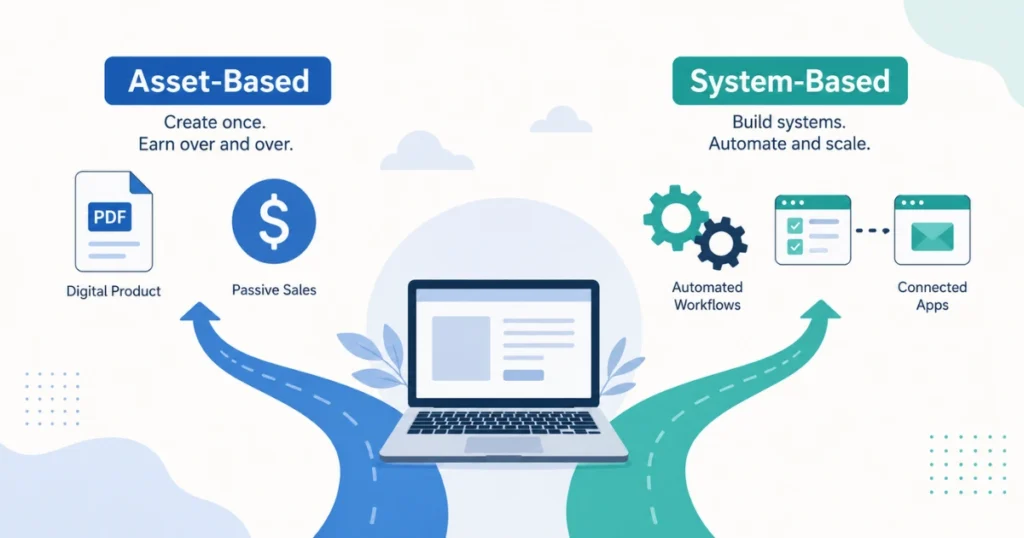
Automated income doesn’t mean no work. It means work done once that generates returns over time — or work that’s been delegated to tools and systems so it doesn’t require your constant involvement.
There are two main types:
Asset-based automation: You create something (a digital product, a course, a piece of content) and the platform distributes it and handles payment for you. Every sale after that is automated. But you had to create the asset first.
System-based automation: You build workflows and processes — using tools like Make, Zapier, email autoresponders, and scheduling software — that handle repetitive tasks automatically. Your time gets freed up, and so does your income capacity.
Real automated online income usually combines both. The asset generates revenue. The systems handle delivery, follow-up, and audience growth without you managing it manually every day.
Now let’s build it.
Related: Best AI Tools to Make Money Online
Step 1: Pick One Income Source to Automate First
The single biggest mistake beginners make when trying to build automated income is trying to do everything simultaneously.
They start a YouTube channel, build a course, set up a print-on-demand store, and write blog posts — all in the same month. Three months later, they’ve made nothing because none of those things got enough attention to actually work.
Automation compounds. But only once the underlying income source is actually generating something to automate.
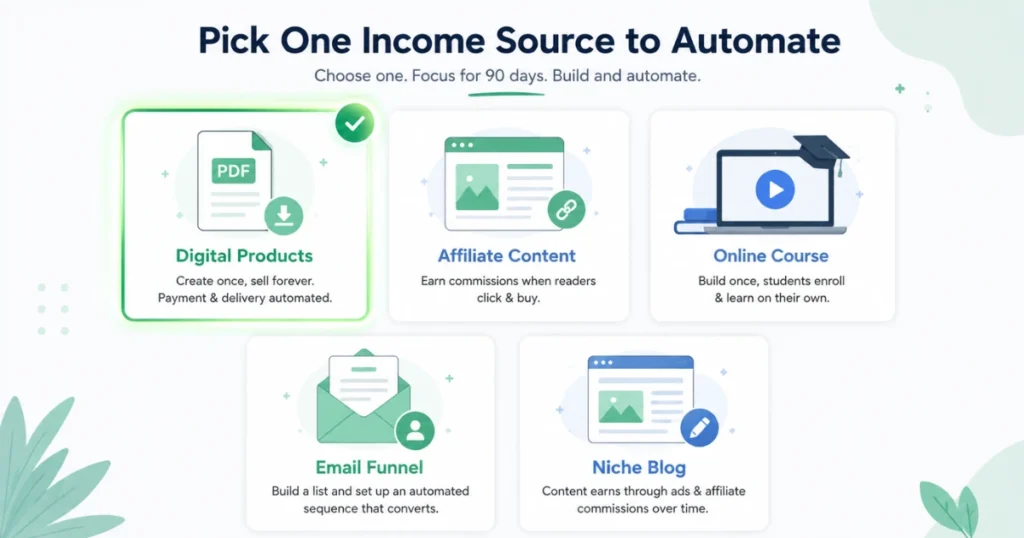
Start with one. Here are the most automation-friendly options:
Digital products (ebooks, templates, prompt packs, printables): Create once, sell forever via Gumroad or Etsy. Payment and delivery are automated from day one.
Affiliate content (blog posts, YouTube videos, newsletters that recommend products): Write or record once, earn commissions when readers click and buy. Traffic does the work over time.
Online courses or workshops: Build once on a platform like Teachable, Gumroad, or Podia. Students enroll and complete on their own schedule. You’re not teaching live every time.
Email newsletter + product funnel: Build an email list, set up an automated welcome sequence that introduces your product, and let it convert while you sleep.
Faceless YouTube channel or niche blog: Content keeps earning ad revenue and affiliate commissions long after you’ve published it — if it ranks or gets discovered.
Pick one. Give it ninety days. Then build on top of it.
Step 2: Create the Asset (The Work You Can’t Skip)

Whatever automated income source you’ve chosen, there’s an asset at the center of it — and that asset has to be good enough that people want it, find it, and pay for it (or engage with it enough to generate ad revenue).
This is the “non-passive” phase. This is where most people give up, because they’ve been sold the idea that automation means immediate ease, and the reality is that building the asset requires real effort.
For a digital product:
- Identify a specific problem a specific type of person has
- Create a solution that’s clear, well-organized, and genuinely useful
- Use Canva free tier for PDFs, or Google Docs for written guides, or Notion for templates
- Price it — usually $7–$47 for beginner-level digital products
For affiliate content:
- Pick a niche where you have real interest or knowledge
- Write honest, useful content around products or tools people in that niche are searching for
- Join affiliate programs: Amazon Associates, ShareASale, Impact, or individual brand programs (many SaaS tools offer 20–30% recurring commissions)
- Publish on a blog (free with WordPress.com or paid hosting on SiteGround/Hostinger) or YouTube
For an email funnel:
- Choose a free resource you’ll offer in exchange for someone’s email address (a checklist, a mini guide, a template)
- Build your email list using ConvertKit’s free tier or Brevo (formerly Sendinblue) — both offer free plans for small lists
- Write a welcome sequence of 3–5 emails that deliver value and introduce your product naturally
- Set the sequence to send automatically to every new subscriber
The asset phase takes four to eight weeks for most beginners working part-time on it. Some take longer. This is where you want to resist the urge to move on to the “next thing” — the automation can’t work until the asset is built.
Step 3: Set Up the Automation Layer
Once your asset exists, this is where the actual automation tools come in. Here’s how to build the layer that handles things without you.
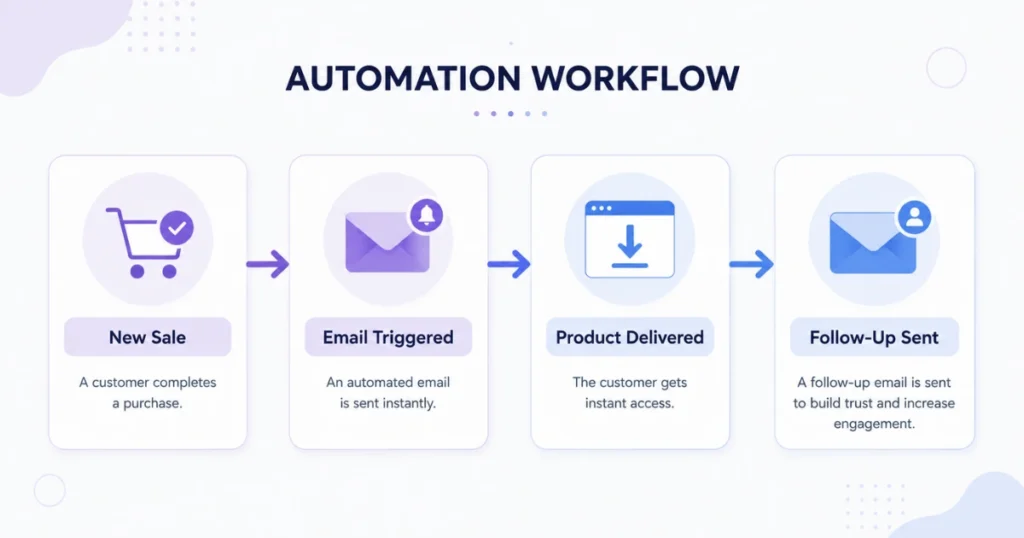
For Digital Products:
Gumroad is my default recommendation for beginners. You upload your product, set your price, and Gumroad handles payments, delivery, and receipts automatically. A buyer pays, receives the download link, and you receive a payout — none of it requires your involvement.
Etsy works the same way for printables and templates — you list, it sells, it delivers automatically.
Payhip is another solid free option with no monthly fee (they take a small revenue percentage).
Related: Using AI to Create and Sell Digital Products
For Email List and Funnels:
Set up your email opt-in form on your site or landing page (tools like ConvertKit, Brevo, and Mailchimp all have free landing page builders).
Write your welcome sequence — typically:
- Email 1: Deliver what you promised (the freebie), warm welcome
- Email 2: Your story or relevant context that builds connection
- Email 3: Introduce your product or service naturally, in the context of solving their problem
- Email 4: Handle common objections or questions
- Email 5: Final soft pitch with a clear call to action
Set this sequence to trigger automatically when someone joins your list. From that point forward, every new subscriber goes through your funnel without you manually sending anything.
For Content Distribution:
Buffer or Later let you schedule social media posts weeks in advance. Write your posts in a batch session, schedule them, and they publish automatically throughout the month.
Zapier (free tier allows 100 tasks/month) or Make (formerly Integromat — free tier available) can connect your tools so they talk to each other. For example:
- New Gumroad sale → automatically adds buyer to your email list
- New blog post published → automatically shares to your social media accounts
- New email subscriber → automatically tags them in your CRM and triggers the welcome sequence
These connections seem small but they eliminate the manual steps that eat your time across dozens of tasks every week.
Related: Top AI Tools for Content Creation and Blogging
Step 4: Build the Traffic Engine (The Part Most People Ignore)
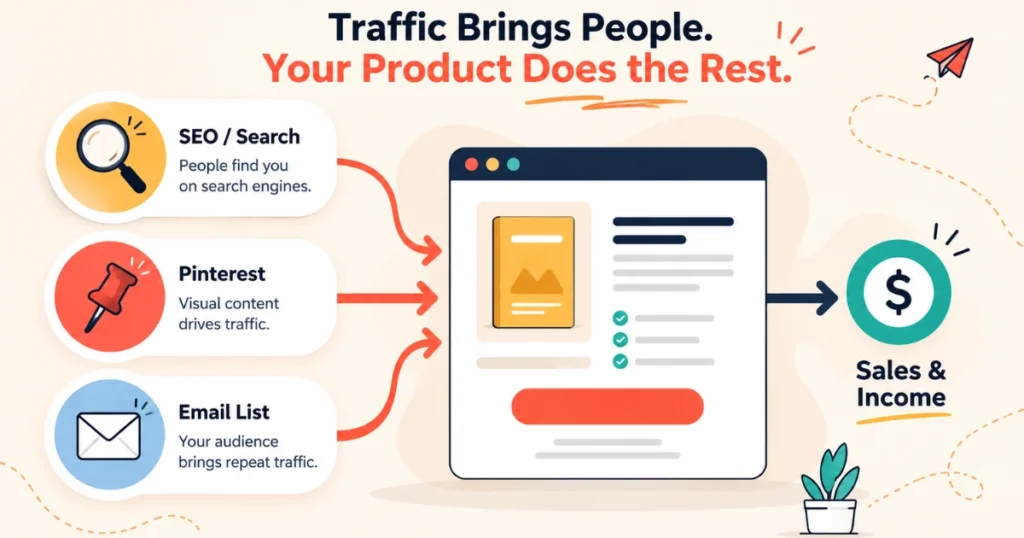
Automation handles delivery. But something has to send people to your product or content in the first place — and that “something” should ideally be automated (or compounding) too.
Here are the traffic sources that work without constant manual effort once established:
SEO content (blog or YouTube): A well-optimized blog post or YouTube video can drive traffic for years after you publish it. This is the most powerful long-term traffic source, but it takes 3–6 months to see meaningful results. Use free tools like Google Keyword Planner or Ubersuggest (limited free tier) to find what people are searching for in your niche.
Pinterest: Unlike Instagram or TikTok, Pinterest is a search engine, not a social feed. Pins drive traffic for months or years after posting. For digital products, printables, and blog content — Pinterest is one of the best zero-cost traffic tools available. Use Tailwind’s free trial or just pin manually at first.
Email list: This is the only traffic source you actually own. Social platforms change algorithms. Google updates rankings. But your email list stays yours. Every new subscriber is a direct line to a warm audience. Growing your list should be a parallel goal alongside building your product.
Referral and word of mouth: If your product is genuinely good, some percentage of buyers will tell others or share it. Building in a referral incentive (Gumroad and Payhip both have affiliate/referral features) can turn happy customers into a passive distribution channel.
Step 5: Track, Adjust, and Layer
This is where most beginners check out — they set things up and then either don’t track anything or obsessively check stats without acting on what they see.
What actually matters to track:
Traffic to your product page or content: Where are visitors coming from? Which sources are growing? Double down on those.
Conversion rate: Of people who visit your product page, what percentage buy? If it’s very low, something on the page isn’t working — usually the headline, the description, or the price.
Email list growth rate: Are new people joining your list consistently? If growth has stalled, you need a better freebie or a new place to promote it.
Revenue per month: Simple. Is it growing, flat, or declining? What changed in the months it grew?
A free Google Sheets tracker with these four numbers — updated monthly — gives you enough data to make real decisions.
Once one income stream is consistently generating something automated (even $100–$200/month), you can layer a second one on top. The first gives you proof of concept, a warm audience to market to, and confidence that the approach works. The second benefits from everything you’ve already built.
Real-World Example: How One Income Stream Got Automated

Let me walk through what this looked like for one specific situation I watched closely.
A freelance social media manager built a simple guide — “The Freelancer’s Client Onboarding Template Pack” — over a weekend. It included a welcome email template, a project intake form, an invoice template, and a 30-day communication checklist. Total time to build: about six hours. She sold it on Gumroad for $17.
She wrote two blog posts targeting keywords like “how to onboard freelance clients” and “freelance client onboarding checklist” — both of which she knew people searched for because she’d searched for them herself when she was starting out. Each post linked to her Gumroad product.
She pinned those posts on Pinterest consistently for about eight weeks.
By month three, the blog posts were getting organic traffic, the pins were driving additional visitors, and the Gumroad product was making 8–12 sales per month with basically no active work. At $17 a sale with Gumroad’s fee, that’s roughly $130–$190/month from a six-hour project built three months prior.
Not life-changing. But genuinely automated. And she’s since built four more products with the same approach, layering income on top of income.
The Automation Tools Worth Knowing (Free and Low-Cost)
For selling digital products:
- Gumroad — free (takes ~10% of sales), handles everything
- Payhip — free (5% fee), clean and simple
- Etsy — $0.20 per listing + transaction fees; massive built-in audience for the right products
For email marketing and automation:
- ConvertKit (now Kit) — free for up to 10,000 subscribers with basic automation
- Brevo — free for up to 300 emails/day, solid automation features
- Mailchimp — free tier available, though it’s become more limited recently
For workflow automation:
- Make (formerly Integromat) — free tier: 1,000 operations/month; more flexible than Zapier for complex flows
- Zapier — free tier: 100 tasks/month; simpler interface, great for straightforward connections
For content scheduling:
- Buffer — free tier: 3 channels, 10 posts per channel queued
- Later — free tier: solid for Instagram and Pinterest scheduling
- Meta Business Suite — completely free for Facebook and Instagram
For building a landing page or simple site:
- Carrd — free tier offers simple one-page sites; Pro is $19/year and genuinely worth it
- ConvertKit’s built-in landing pages — free with their email plan
- Notion — you can create a surprisingly clean “portfolio/product page” in Notion and share the link publicly for free
Related: AI Side Hustles You Can Start With Zero Investment
Mistakes That Slow Down Automation (Learned the Hard Way)
Building the automation before the product is good. I did this. I spent a week setting up email sequences and Zapier flows for a product that nobody was buying because the product itself wasn’t solving a clear problem. The automation amplified nothing. Fix the product first.
Neglecting the traffic piece. Automation handles what happens when someone finds you. It cannot create discovery. A fully automated funnel with no traffic is a beautifully constructed system with no inputs. Content creation, SEO, Pinterest, and email list growth have to run in parallel.
Choosing a platform that locks you in. Some platforms have great features but make it hard to export your audience or data if you want to leave. Always check what happens to your buyer list or email list if you ever migrate. Gumroad and ConvertKit both allow full data export, which matters.
Expecting automation to fix a broken offer. If people aren’t buying or engaging before automation, they won’t after either. Automation scales what’s working — it doesn’t fix what isn’t.
Setting it and completely forgetting it. Automated doesn’t mean maintenance-free forever. Email sequences need occasional updating. Product listings benefit from refreshed descriptions. Content needs to be promoted to new audiences. Check in monthly, even if you’re not doing daily management.
What a Realistic Timeline Looks Like
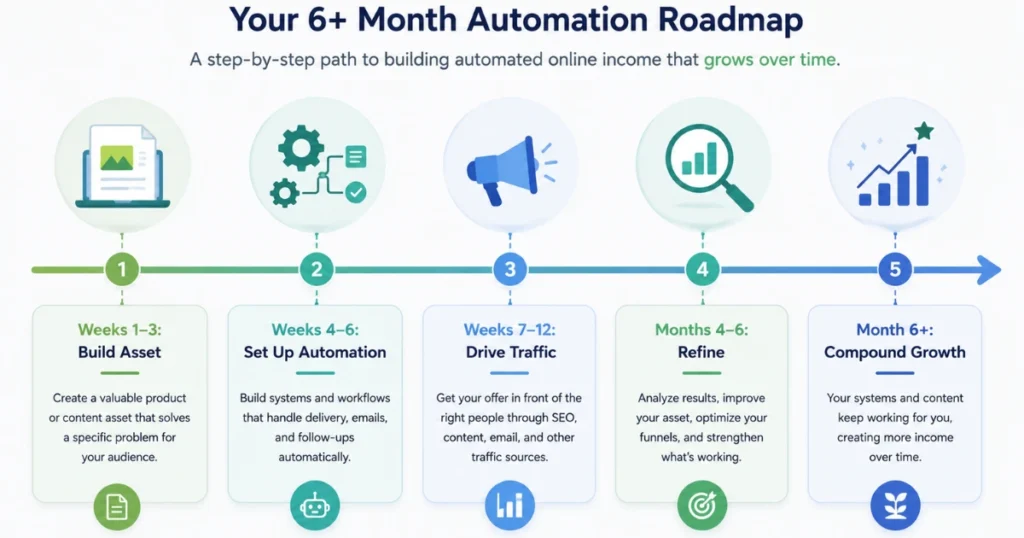
Weeks 1–3: Choose your income source. Build or create the asset. Get the basics live (product listed, opt-in page up, first piece of content published).
Weeks 4–6: Set up the automation layer. Email welcome sequence live. Scheduling tools connected. Zapier or Make flows built for the most repetitive tasks.
Weeks 7–12: Drive traffic consistently — Pinterest, blog posts, social content, whatever matches your model. Watch what works and do more of it. First sales or conversions usually start appearing in this phase.
Months 4–6: Refine based on data. Fix conversion rate issues. Grow email list. Consider adding a second product or content stream.
Month 6+: With two or three assets live and automated, monthly income from them starts to feel meaningful and predictable. The compound effect becomes visible.
This timeline is realistic for someone putting in 8–12 hours per week. It can move faster with more hours and sharper focus. It will stall without consistent traffic-building effort.
Closing Thoughts
The $47 sale at 2:14 AM was real. But it was the result of three months of content writing, product building, email setup, and Pinterest activity that happened very much while I was awake.
Automated income isn’t a shortcut to the work. It’s a destination you build toward by doing the work in a smart, stackable way — so that what you build once keeps working after you’ve moved on.
The people who build this successfully are the ones who accept the unsexy first phase, execute it consistently, and don’t abandon ship right before things compound.
Start with one asset. Automate its delivery and follow-up. Build its traffic engine. Track what’s working. Layer the next thing on top.
That’s the whole system. Everything else is just variations on those steps.
FAQs
How long does it take to build automated online income?
Realistically, 4–6 months to see meaningful, consistent automated income — assuming part-time effort and consistent traffic-building. Some people move faster. Most who “fail” quit in month two or three, right before compounding starts.
Do I need to invest money to automate online income?
Not to start. Gumroad, ConvertKit (free tier), Buffer, Make, and Canva all have free plans that cover everything a beginner needs. Investing in paid tools (better email platform, faster hosting, Canva Pro) makes sense once you’re generating revenue to reinvest.
What’s the easiest automated income source for beginners?
Digital products on Gumroad paired with Pinterest traffic is one of the most accessible combinations — low technical barrier, clear distribution path, and genuinely automated delivery from day one.
Can you automate freelancing income?
Partially. You can automate lead generation (SEO content, LinkedIn posting), client onboarding (automated welcome emails, contracts via tools like Bonsai), invoicing (Wave or Bonsai automate invoice reminders), and follow-ups. You can’t fully automate the work itself — but you can automate everything around it to increase capacity.
What’s the difference between automated income and passive income?
They’re often used interchangeably, but there’s a subtle difference. Passive income implies you do nothing to earn it. Automated income is more accurate — it means the systems do the recurring work, but you built those systems, maintain them occasionally, and continue to drive traffic or update offerings. Almost no truly passive income exists online; most requires some ongoing attention.