The first post I ever wrote that ranked on page one — genuinely, organically, position three — was a 1,400-word article I almost didn’t publish.
I’d written it quickly, half-convinced it wasn’t good enough. But I’d done one thing differently from all my previous posts: I’d actually looked up what people were searching for before I started writing. Not after. Before.

That one change — doing the research before opening a blank document — is the single biggest shift most bloggers never make. They write what they want to write, not what their potential reader is typing into Google at 11pm.
This guide covers the full process of writing a blog post that ranks: what to do before you write, how to structure the post itself, what on-page SEO actually means in practice, and the mistakes that quietly keep most posts buried on page two indefinitely.
Start With Keyword Research, Not the Writing

Writing a post without checking search demand first is like building a shop on a road with no traffic. The content might be brilliant. Nobody will find it.
Keyword research doesn’t have to be complicated. The goal is simple: find out what exact phrase your target reader is typing into Google, and write a post that answers it better than whatever’s currently ranking.
How to find the right keyword before you write
Step 1 — Start with a question, not a topic. Instead of “I’ll write about email marketing,” think about what specific question someone would search. “How to start an email list for free.” “Best free email marketing tools for bloggers.” “How many subscribers do you need to make money from email?”
Those are rankable search queries. “Email marketing tips” is a topic — too vague to target.
Step 2 — Type it into Google and observe. Before opening any tool, just search your phrase. Look at:
- What pages are ranking (are they blog posts like yours, or huge brand sites?)
- The “People Also Ask” box (real questions real people are searching)
- The autocomplete suggestions (tell you exactly how people phrase it)
Step 3 — Check search volume and difficulty. Free tools that work well for this:
- Google Search Console — shows you what queries are already bringing impressions to your existing posts
- Ubersuggest (free plan) — basic volume and competition data
- Keywords Everywhere (Chrome extension, low cost) — shows volume as you browse Google normally
- Ahrefs Webmaster Tools (free version) — surprisingly useful keyword data if you connect your site
You’re looking for a keyword with at least a few hundred monthly searches and a Keyword Difficulty low enough that independent blogs can rank. As a newer blog, targeting KD 0–20 is realistic. As you build authority, you can push into harder territory.
Step 4 — Check the actual competition. Google your target phrase and look at the top five results. Are those pages from massive authority sites (NerdWallet, Forbes, WebMD)? If yes, this keyword is very hard to crack for a newer blog. Are some results from independent blogs, niche sites, or smaller publications? That’s your signal there’s room.
You’re not looking for zero competition. You’re looking for “competition I can be better than.”
How to Structure a Post Google Actually Wants to Rank
Most beginners think writing for Google means stuffing in keywords. It doesn’t. It means organising your post so clearly that someone can find the answer to their question without scrolling forever — and so clearly that Google can understand exactly what the post is about.
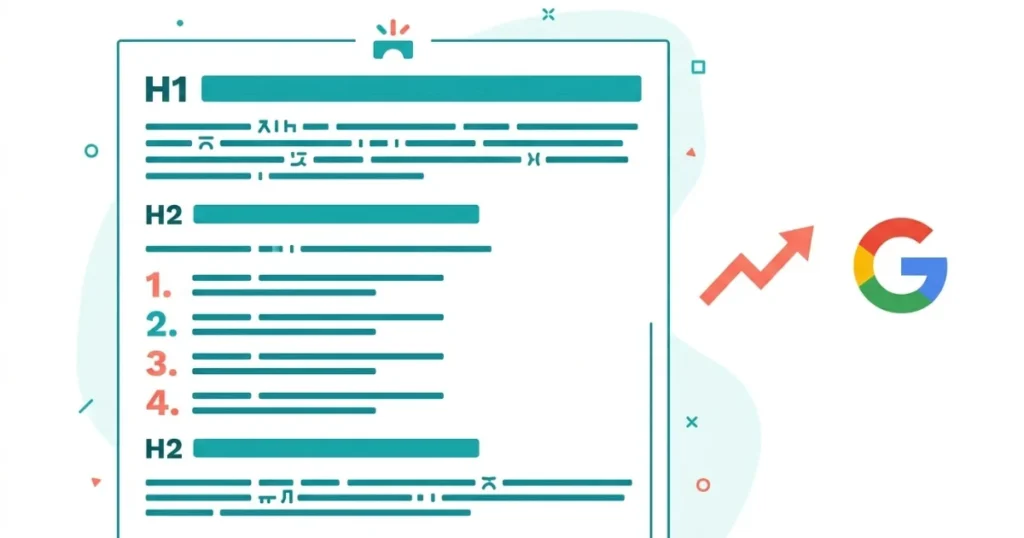
Here’s the structure that works:
The title (H1)
Your title should contain your primary keyword, ideally close to the beginning. It should also be something a human would actually want to click.
“How to Write a Blog Post That Ranks on Google” works because it’s the exact phrase someone might search, and it tells them precisely what the post delivers.
Keep titles under 60 characters where possible so they don’t get cut off in search results.
The introduction (first 150 words)
Two jobs: hook the reader, and tell Google what the post is about.
In the first paragraph, use your primary keyword naturally — not stuffed in awkwardly, just genuinely present in the opening context. Readers and search engines both look at the opening lines to decide whether to keep reading.
Start with a story, a problem, a surprising observation — not a dictionary definition. Definitions kill engagement immediately.
H2 and H3 headings
Break your post into logical sections with H2 headings. Use H3 headings for subsections within those.
Headings serve three purposes:
- They help readers scan and navigate
- They signal structure to Google
- They’re the most common source of featured snippets when phrased as questions or direct answers
Use your secondary keywords naturally in headings where they fit. Don’t force it.
Short paragraphs
Two to four sentences per paragraph, maximum. Long walls of text lose readers fast — especially on mobile. If a paragraph runs over five lines, split it.
Lists and numbered steps
Whenever you’re explaining a sequence (steps, instructions) or a collection (tools, options, reasons) — use a list. Lists are easier to read, and they’re the most common format for featured snippet extraction.
A clear conclusion that doesn’t just summarise
Don’t end with “In conclusion, writing a blog post that ranks requires X, Y, Z.” That’s what every bad blog post ends with. Instead, give the reader something to do next: a related post to read, a tool to try, a first step to take.
Write for the Person First, the Algorithm Second
Here’s the tension most people over-complicate: writing for readers and writing for search engines are not opposites. They’re the same goal.
Google’s ranking systems are specifically designed to reward content that genuinely helps the person searching. Thin content that exists to host keywords — not to answer questions — gets filtered out increasingly effectively.
What actually matters to readers (and therefore to Google):
Does the post answer the question it promised to answer? This sounds obvious. A surprising number of posts bury the answer behind three paragraphs of preamble.
Is the reading experience easy? Short paragraphs, clear headings, no jargon unless necessary and explained.
Does it go deep enough? Surface-level answers get replaced by deeper ones. If someone can read your post and still have the same questions they arrived with, you haven’t done the job.
Does it feel like it was written by someone who’s actually done this? First-person experience, specific details, real mistakes — these all signal genuine expertise in a way that generic advice doesn’t.
On-Page SEO: The Checklist That Actually Matters
Once you’ve written the post, this is what needs to be in place before you hit publish:
Primary keyword in the title (H1) — ✅ Ideally in the first half of the title.
Primary keyword in the first 100 words — ✅ Not forced. Just naturally present in the opening context.
Primary keyword in at least one H2 — ✅ Again, naturally — not every H2, not keyword-stuffed.
Meta description written (under 155 characters) — ✅ Include your keyword. Write it for the human who sees it in search results, not for the algorithm. It doesn’t directly affect ranking, but it affects click-through rate — which affects ranking.
URL slug is clean and contains the keyword — ✅ /how-to-write-a-blog-post-that-ranks-on-google/ — not /post-234/?p=1. Set this in WordPress before publishing. Changing it later causes redirect issues.
Images have descriptive alt text — ✅ Alt text serves two purposes: accessibility for screen readers, and a small SEO signal. Describe what’s in the image using natural language. “Keyword keyword keyword” as alt text is worse than nothing.
Internal links to at least two related posts — ✅ Link to other posts on your blog where relevant. This helps readers find related content and helps Google understand your site’s topical structure. Don’t just link anything — link posts that are genuinely related to the topic.
External link to at least one authoritative source — ✅ (where applicable) Linking out to credible sources is fine and can actually support your E-E-A-T signals. Don’t be afraid of it.
Post is over 1,000 words for most topics — ✅ Word count isn’t a ranking factor directly — but adequate depth of coverage is. A 600-word post rarely covers a topic with enough depth to outrank a properly written 1,800-word post on the same topic.
Rank Math or Yoast shows green on your focus keyword — ✅ (optional check) These plugins give you a quick checklist. Don’t optimise blindly for the score — but they catch obvious misses.
The Part Nobody Writes About: Updating Old Posts
Most SEO guides talk only about new posts. But one of the highest-ROI activities for any blogger is returning to posts that are almost ranking and improving them.
If a post is on page two — position 11–20 in Google Search Console — it’s a candidate for an update. Add more depth. Fix thin sections. Add a relevant internal link. Improve the title. Refresh any outdated information.
A post that ranks position 14 and gets lifted to position 5 after a thorough update delivers dramatically more traffic than writing a brand new post from scratch.
Check Google Search Console monthly. Filter for queries where your average position is between 8 and 20. Those are your update targets.
Mistakes That Keep Posts on Page Two Forever

Writing without a specific target keyword. “I’ll write about productivity” is not SEO. “The best free productivity apps for remote workers in 2026” is a post someone might actually search for. The specificity is the SEO.
Targeting keywords that are too competitive for your domain authority. Writing a post targeting “best laptops” as a new blog competing with CNET and The Verge isn’t SEO — it’s shouting into a void. Start with long-tail, specific, lower-competition queries. Build authority. Move up.
Publishing and never returning. Most posts don’t rank immediately. They need time to be crawled, indexed, and assessed. Then, once they’re in the index, updating them when they’re close to ranking is where the real gains happen.
Ignoring page speed and mobile experience. A post that loads in 8 seconds on mobile will not hold rankings against one that loads in 1.5 seconds on the same topic. Core Web Vitals are a real ranking signal. Compress your images, use a caching plugin (WP Rocket or LiteSpeed Cache work well), and check your score in Google PageSpeed Insights.
Over-optimising for SEO and forgetting the reader. Using your keyword in every other paragraph. Writing section headers that sound like keyword lists. Creating content that exists to rank, not to be read. Google’s systems have become significantly better at detecting and downranking this pattern. Write for the person. The algorithm follows.
Thin content that answers one surface-level thing. If someone searches “how to write a blog post that ranks” and your post only tells them to “use keywords and write good content” — they’re clicking back to Google immediately. Pogo-sticking (quick returns to search results) is a real quality signal. Answer the question fully.
How Long Does It Actually Take to Rank?

Honest answer: most blog posts take between three and eight months to reach their peak ranking position, assuming they’re properly optimised and targeting achievable keywords.
Some rank faster — especially on sites with existing authority or for very low-competition queries. Some take longer, particularly in competitive niches.
The mistake is checking rankings weekly in month one and deciding nothing is working. The work compounds slowly. A post that ranks position 22 in month two might be at position 8 by month five, with no additional changes.
Set a reminder to check your posts in Google Search Console at the three-month mark. That’s when the picture starts to clarify.
Putting It All Together
Writing a post that ranks isn’t one single technique — it’s a process that starts before you open a document and continues long after you hit publish.
The sequence that works:
- Research your keyword before writing anything — find what’s being searched, check competition, validate demand
- Structure the post clearly — title, intro, H2 headings, short paragraphs, lists
- Write for the reader — answer the question fully, use your own experience, go deeper than the surface
- Complete the on-page checklist — keyword placement, meta description, URL, alt text, internal links
- Publish, wait, and return — monitor Search Console, update posts approaching page one, never abandon a post that’s almost ranking
The bloggers who rank consistently aren’t doing anything secret. They’re doing these basics, every time, and then sticking around long enough to reap the result.
If you’re still setting up your blogging foundation, start with the complete guide to starting a blog and making money from it before going deep on SEO.
And if you want to estimate what a ranked post in your niche could realistically earn, the Blog Income Calculator gives you a grounded sense of the income range at different traffic levels.
Frequently Asked Questions
Q1: How long should a blog post be to rank on Google?
There is no exact word count that guarantees ranking. The post needs to cover its topic with enough depth to satisfy the reader’s search intent — which for most informational queries means somewhere between 1,200 and 2,500 words. Shallow 400-word posts rarely outrank well-written 1,800-word ones on the same topic. The test is whether a reader finishes the post still having the questions they arrived with.
Q2: How many keywords should I use in a blog post?
Focus on one primary keyword and let secondary, related terms appear naturally throughout. There is no specific keyword density to aim for — Google’s systems evaluate semantic relevance, not keyword count. Writing naturally about a topic will produce the right variations automatically. Forcing keywords into every paragraph actively harms readability and is a known negative signal.
Q3: What is the most important on-page SEO element for a blog post?
The title tag (H1) carries the strongest single on-page signal. It tells both Google and the reader exactly what the post covers. Your primary keyword should appear in the title, ideally in the first half. After the title, the meta description, URL slug, and first 100 words all contribute meaningfully.
Q4: How long does it take for a blog post to rank on Google?
Most blog posts take between three and eight months to reach their peak ranking position, assuming proper on-page SEO and realistic keyword targeting. Posts on new domains with low authority may take longer. Posts targeting very low-competition keywords on established sites can rank within weeks. Checking rankings in month one and drawing conclusions is too early.
Q5: Should I use Rank Math or Yoast for SEO?
Both work well for beginners. Rank Math has a slightly more generous free tier and an easier-to-read checklist interface. Yoast is more established and has a larger support community. Neither is meaningfully better for actual ranking outcomes — they both surface the same on-page fundamentals. The more important practice is understanding why those fundamentals matter, not just chasing a green score.
Q6: Does updating old blog posts help with rankings?
Yes — updating posts that are already indexed and approaching page one is one of the highest-ROI activities in blogging. Adding depth, refreshing outdated information, improving the title, and strengthening internal links can all move a post from position 14 to position 5. Google also appears to reward freshness signals for regularly updated content. Check Search Console monthly for posts in positions 8–20.
Q7: Do I need backlinks to rank a blog post?
Backlinks help, especially in competitive niches, but they are not the only path to ranking. For lower-competition queries, a well-written, properly structured post on a site with reasonable topical authority can rank without any external backlinks. Focus on content quality and on-page SEO first. Backlinks compound over time as more people find and reference good content.
Q8: What is search intent and why does it matter for ranking?
Search intent is the underlying reason behind a search query — what the person actually wants to find. Google categorises this broadly as informational (learning), navigational (finding a specific site), commercial investigation (comparing options), and transactional (ready to buy). A post’s format and content need to match the dominant intent for its keyword. A sales page targeting an informational query, or an opinion post targeting a comparison query, will struggle to rank regardless of its SEO.
Q9: Should I include images in every blog post?
Images improve engagement and break up long text, which improves time-on-page — a signal Google monitors. They also create image search ranking opportunities if named and alt-tagged correctly. That said, every image adds to page weight, which affects load speed. Use relevant images with descriptive alt text and compress them to under 100KB (under 200KB for hero images) before uploading. Quality over quantity.
Q10: How do I find low-competition keywords as a new blogger?
Look for long-tail queries — specific, multi-word phrases rather than broad single-word topics. Use Google autocomplete and the “People Also Ask” section to find question-based searches. Check volume and difficulty using free tools like Ubersuggest or Keywords Everywhere. Prioritise Keyword Difficulty scores under 20 on Ubersuggest or under 15 on Ahrefs scale. Also mine Reddit, Quora, and niche Facebook groups for the exact questions your target reader asks — these often translate directly into rankable, low-competition blog post topics.