When I first created my digital product — a simple Notion template — I had no idea what to charge for it.
I remember sitting there, staring at the price field on Gumroad, completely frozen. I typed $3. Then deleted it. Then typed $15. Deleted that too.
I ended up going with $5 because it “felt safe.” Spoiler: I made a few sales, made almost nothing, and then spent weeks wondering why I was putting so much effort into something that earned me less than a latte.

The truth is, pricing is where most digital product creators mess up — not because they’re greedy or underconfident, but because nobody actually teaches you how to think about it.
So let me share what I’ve learned — through mistakes, late-night research rabbit holes, and a lot of trial and error.
Why Pricing Is the Hardest Part (and Why It Matters So Much)
Here’s the thing about digital products: they cost almost nothing to replicate. Once you make an ebook or a template, selling it to 10 people costs the same as selling it to 1,000.
That’s the magic. But it also messes with your head.
Because there’s no “cost of goods,” your brain struggles to put a value on what you made. You start thinking like a buyer instead of a creator. You think, “It’s just a PDF. Who’s going to pay $47 for that?”
But buyers don’t think like that. They pay for the outcome your product gives them.
A $27 ebook that saves someone 20 hours of research? That’s a steal. A $5 template that helps someone look more professional and land their first freelance client? Worth way more than $5.
Pricing isn’t about what it cost you to make. It’s about what it’s worth to the buyer.
Step 1: Define What Your Product Actually Does
Before you open any price comparison tab, stop and answer this:
“What does my product help someone do, avoid, or feel?”
Get specific. “Helps people be more productive” is vague. “Helps a first-time freelancer send professional invoices without looking like a beginner” is specific.
The more specific and valuable the outcome, the more you can charge.
Write it down. Seriously. One sentence. This is the foundation of your pricing decision.
Step 2: Research What the Market Is Actually Paying

Now look at what similar products are selling for — but do this with a critical eye.
Go to:
- Etsy (search your product type, filter by “Most Relevant” and look at what’s selling — not just what’s listed)
- Gumroad (check discover section or search your niche)
- Payhip, Stan Store, or Creative Market (depending on your niche)
When I was pricing a social media template pack, I found listings ranging from $2.99 to $49. The lowest ones had hundreds of sales. The highest ones? Also had hundreds of sales.
What that told me: both work. But the ones priced higher were positioned differently — better mockups, clearer descriptions, stronger social proof.
So don’t just copy the lowest price. Look at:
- What’s selling (check reviews/sale counts, not just listings)
- What the best-sellers are doing differently
- Where there’s a gap — often at the $15–$29 range, which is the sweet spot for impulse buys
If you already run a shop and want to improve how your listings show up, check out my post on Etsy SEO Tips for Digital Products That Rank Fast — because even perfect pricing won’t save a product nobody can find.
Step 3: Use the Value Ladder (Don’t Just Pick One Price)
One of the biggest mindset shifts I had was realizing you don’t have to charge one price for everything.
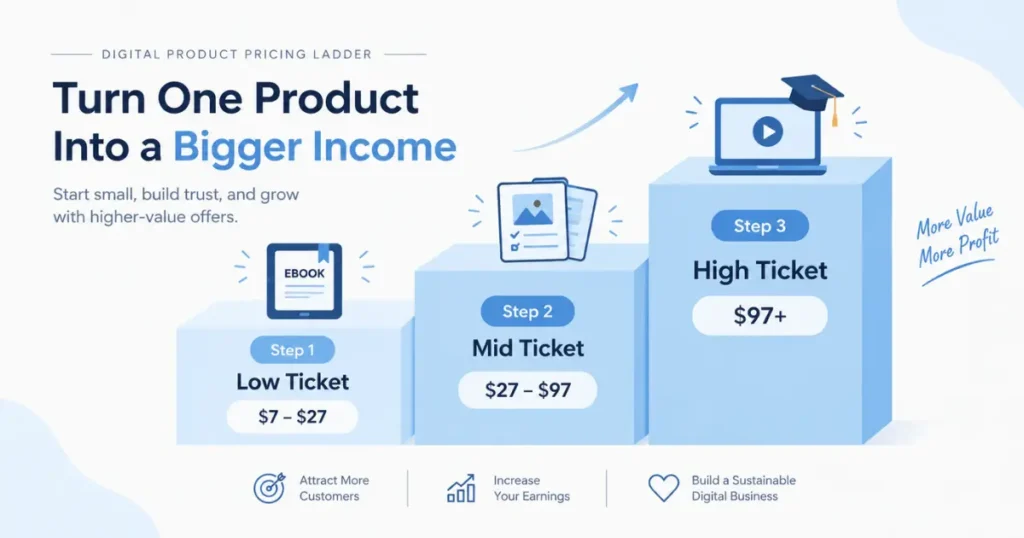
A value ladder means offering products at different price points so different buyers can enter at their comfort level.
Here’s what a simple one looks like:
Tier 1 — Low Ticket ($7–$27) A single template, mini-guide, or starter pack. Great for building trust and getting your first 50 buyers.
Tier 2 — Mid Ticket ($27–$97) A full template bundle, deeper guide, or swipe file pack. This is where most of your revenue can come from.
Tier 3 — High Ticket ($97–$297+) A course, coaching add-on, or premium system. Not everyone needs this, but it dramatically increases your earnings per customer.
The goal isn’t to start with all three. But when you’re setting your price, think: “Where does this fit in a progression?”
If you’re launching your first product, starting at Tier 1 makes sense. You’re building social proof and email subscribers. Then you work toward a Tier 2 offer that complements it.
I have a whole breakdown on How to Build Passive Income with Digital Products that goes deeper on this stacking strategy if you want to see how it works in practice.
Step 4: Test Your Price (Yes, Really)
A lot of people treat pricing like it’s permanent. It’s not.
The best thing you can do when you’re unsure is launch at a price, watch what happens for 2–4 weeks, and adjust.
Here’s a simple testing approach:
- Launch at your “gut feel” price
- Track: Are people clicking but not buying? (Price may be too high or the sales page is weak)
- Are they buying immediately without hesitation? (You might be priced too low)
- After 20–30 sales, consider a 20–30% price increase
When I increased the price of a resume template from $9 to $17, sales actually went up. Not because more people showed up — but because the higher price made it feel more legitimate.
Counterintuitive? Yes. But it happens more than you’d think.
Step 5: Factor In Platform Fees and Your Goals
Before you finalize your price, do some quick math.
Different platforms take different cuts:
- Etsy: Listing fee + ~6.5% transaction fee + payment processing
- Gumroad: 10% on free plan, drops with paid plan
- Payhip: 5% on free plan, 0% on paid
- Your own site (Stripe/PayPal): ~2.9% + $0.30
So if you price at $9 and Etsy takes ~$1.50 per sale, you’re making $7.50 before tax.
Decide how many sales you want per month and work backward. Want to make $500/month from one product?
- At $9 → you need 56 sales
- At $27 → you need 19 sales
- At $47 → you need 11 sales
Suddenly $47 doesn’t seem so scary.
And if you’re exploring where to sell in the first place, my breakdown of the Best Platforms to Sell Digital Products walks through the exact tradeoffs between Etsy, Gumroad, Payhip, and your own store.
Common Pricing Mistakes to Avoid

I’ve made most of these. Learn from me so you don’t have to learn from your bank account.
Mistake 1: Pricing based on what YOU would pay You’re not your customer. Someone making $80k/year sees a $47 ebook very differently than you do if you’re in a totally different financial situation.
Mistake 2: Racing to the bottom Undercutting everyone else just starts a war you can’t win. Someone will always go lower. Compete on value, not on cheapness.
Mistake 3: Thinking price = sales Lower prices don’t automatically mean more sales. I’ve had $4 products flop and $37 products fly because the higher-priced one had a cleaner sales page and better positioning.
Mistake 4: Never raising your prices If your product has been out for 6+ months and getting consistent reviews, it’s earned a higher price. Don’t be afraid to increase it.
Mistake 5: Hiding behind “I’ll figure out pricing later” Later never comes. Pick a number, launch, and adjust. Done is always better than perfect.
What About Discounts and Sales?
Used strategically, discounts work well. But if your product is always on sale, it devalues it.
Here’s what I recommend:
- Launch price — offer a lower introductory price for the first 1–2 weeks to get initial reviews
- Seasonal sales — Black Friday, New Year, and your “shop anniversary” are great moments
- Bundle discounts — offer a deal when someone buys two or more of your products
Avoid putting things on “permanent sale” or using fake crossed-out prices you never actually charged. Buyers are smarter than that, and it erodes trust.
Pulling It All Together

Pricing isn’t something you set once and forget. It’s something you revisit as your audience grows, your skills sharpen, and your positioning improves.
Start somewhere real. Not $1 (please, not $1). Not $997 if you have zero social proof. Somewhere honest, backed by your research, and tied to the specific value your product delivers.
If you’re just starting out, I’d suggest:
- A simple template or guide: $7–$17
- A bundle or deeper resource: $27–$47
- A comprehensive course or system: $97+
Then watch what happens. Adjust. Keep going.
You built something valuable. Charge like you believe that — and your customers will believe it too.
If you’re still building out what you’re going to sell, my post on Digital Product Ideas That Sell Without a Big Audience might help you figure out what to create before pricing it.
And once you have your product and price locked in, make sure people can actually find it — How to Market Digital Products Without Paid Ads is the next logical step.
Frequently Asked Questions
1. How do I know if my digital product price is too high?
Watch your conversion rate. If you’re getting lots of clicks but very few sales, your price may be too high — or your sales page isn’t convincing enough. Try lowering the price temporarily and see if it changes.
2. Should I price my first digital product low to get reviews?
Yes, a launch price makes sense — but don’t go too low. $7–$17 is a healthy range for a first product that gives you room to collect real buyers without burning yourself out at $1.
3. Is it okay to raise prices after people have already bought?
Absolutely. Existing buyers keep their access (if applicable) and new buyers pay the new price. Just don’t promise anyone a “permanent” price if you plan to raise it.
4. What’s the best price point for Etsy digital products?
The $5–$25 range performs well on Etsy because it fits the platform’s impulse-buy culture. For higher-ticket offers, your own site or Gumroad often works better.
5. Do lower-priced digital products sell more?
Sometimes — but not always. Price is just one factor. Listing quality, social proof, SEO, and how well you communicate value matter just as much.
6. How do I price a digital product when I have no audience?
Research what’s already selling in your niche, price competitively (not the cheapest, not the most expensive), and lead with a clear outcome in your description. Your first 10 buyers won’t come from your audience — they’ll come from search.
7. Should I offer a free version of my digital product?
Only if it genuinely leads people to your paid offer. A free lead magnet can work — but giving away the whole product for free trains people not to pay. Be intentional about it.
8. Can I charge more if my product is AI-assisted?
Yes — what matters is the value delivered, not how you made it. If you used AI tools to create a high-quality, well-designed product that solves a real problem, charge accordingly. For more on this, check out Using AI to Create and Sell Digital Products.
9. What’s a value ladder and should every creator have one?
A value ladder is a progression of products at different price points. You don’t need one on day one, but building toward it — starting low, creating a mid-tier offer, eventually a premium — dramatically increases your income per customer.
10. How often should I revisit my pricing?
Review it every 3–6 months, or sooner if your sales are unusually high or low. As you build more reviews and social proof, your pricing should gradually climb to reflect your established value.